
In this post we are going to explain how to carry out a performance evaluation process from a technical point of view, first from a general approach and then seeing how to do it with HRider.
The Performance Evaluation process
The Competency Performance Evaluation process is a recurring process over time whose main purpose is to measure the performance of each member of the organization in the competencies of their job position. In a previous post we talked about the 10 reasons for carrying out a Performance Evaluation, which deals in detail with the objectives and motivations for carrying it out.
The first step to carry out a Performance Evaluation is to decide for each job position, which competencies are to be included and what degree of demand each of them requires. In general, for each job we will have two types of competencies:
-
General Competencies. They are skills not directly related to a specific job. They are competencies aimed at promoting the culture and values of the organization as well as requirements that the organization wants to extend to all its members. For example: Teamwork, Honesty, Commitment, etc.
-
Specific Competencies. Skills required for the job. They can change for each job or require a different level of demand. For example, the “Commercial” position may require the “Public Speaking” competency to a higher degree than the “Operator” position.
We will therefore have to compile all the competencies that we want to evaluate for each job position, including a description of the competency for each competency together with its degrees of compliance. These competencies will then be used to create the surveys with which each member of the organization will be evaluated.
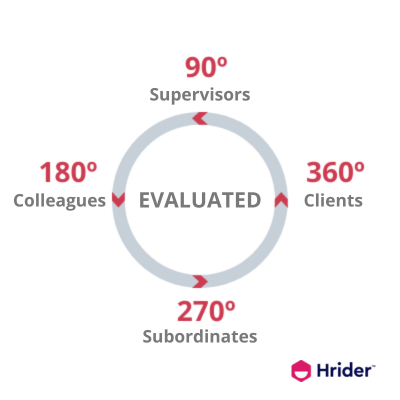
The second step is to decide for each job which methodology we are going to apply: 90, 180, 270 or 360 degrees. The following graph visually shows the correspondence between the number of grades and the role of the evaluator:
-
90º if a person will only be evaluated by their immediate superior.
-
180º if your colleagues will also evaluate you.
-
270º if your subordinates will also evaluate you.
-
360º if, in addition to all of the above, your clients, internal or external, will also evaluate you.
Indeed, the 360º evaluation is the most complete and real that we can do since it is the one that gives us the most complete vision of a person, but as can be guessed it is also the most technically complicated to carry out. A person evaluated by the 360º method may require at least 8 surveys (self-assessment, 1 boss, 2 colleagues, 2 subordinates, 2 clients). If we multiply by the number of people, the volume of information to manage can be considerable, and for good reason. so that we have specialized technical solutions such as Hrider to handle all this information in an agile and secure way before embarking on an adventure of these dimensions.
Once we have decided on the competencies and methodology applied to each job position, we would need to create the survey models for each position and distribute them among the evaluators to carry them out.
Finally , once the surveys have been completed, we would proceed to collect and analyze the results, both global and individual per person, for which at least one personal interview would be established to discuss the results report obtained. with each evaluated.
Technical challenges of a Performance Evaluation
As we have seen, carrying out a Performance Evaluation requires important planning and work on the part of the human resources department, which can sometimes be underestimated by the rest of the organization. The main challenges that we must address to carry out a Performance Evaluation are:
-
Create attractive surveys, both in their use and in their presentation, which prevent the evaluator from perceiving it as a boring task of no importance.
-
Capacity to manage information, both when distributing surveys and collecting and processing them. Doing it on paper or with a non-specialized tool like Excel is sure to lead to failure of the process.
-
Capacity to analyze and exploit information from different points of view, as well as to generate attractive and intelligible reports that add value to aid decision-making.
-
Quickness to complete the entire process. It is of little use to have the results of the reports 3 months after carrying out the evaluation.
The risk of failing in the management of a Performance Evaluation can suppose, in addition to the useless waste of time and resources, generating equivocal or partial results that lead to incorrect decisions, the loss of talent and competitiveness of the entire organization, and the impossibility of to do it again in the following years for fear of failure.
The Performance Evaluation process with Hrider
The evaluation process in Hrider is managed in 3 phases that are consistent with the steps outlined above:
-
Design of the evaluation.
-
Generation of surveys.
-
Sending surveys, monitoring and closing the evaluation.
Next we will see how to design the evaluation and how to configure different aspects of it.
In subsequent posts we will see the rest of the phases and other aspects of the solution that solve the challenges and difficulties described above in an easy and elegant way.
Designing an Assessment
To create an evaluation, we must have previously created our organization, that is, the jobs that we want to evaluate and have associated the people who form it to each position. We will have also defined the relationships or roles between people: superior, colleague, subordinate and client.
From the “ORGANIZATION” tab we can define all this information or import it directly from a CSV file, these files can be created with Excel or with a simple text editor. In a future post we will discuss the details of creating an Organization as well as the creation and customization of survey models. Now we are going to focus on the specific process of the evaluation.
Once we have decided which positions and which people will be evaluated, we can start the process by creating a new evaluation. From the “EVALUATIONS” tab, click on the “New” button, the evaluation editor will be displayed in the “Design” phase, which serves to define how our evaluation will be, its general data and its configuration, and how and who we are going to evaluate.
General Information
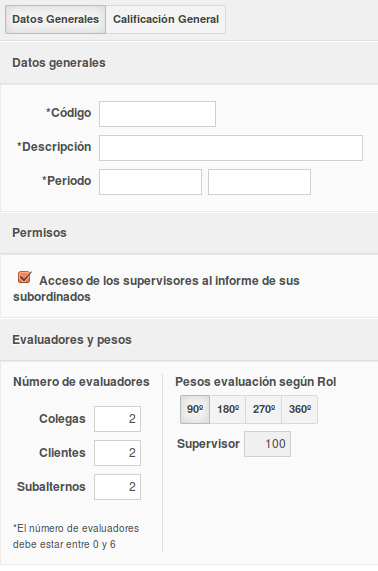 The general data allows us to identify the evaluation and will be included in the reports and surveys that we carry out:
- Code. An identification code for the evaluation. For example: EVAL2014 1ºS
- Description. The description of the assessment. For example: EVALUATION FIRST SEMESTER OF 2014
- Period. The period that the evaluation intends to evaluate. For example: from 01/01/2014 to 06/30/2014
Permission "Access of supervisors to the report of their subordinates"
This permission allows supervisors to control access to reports.
If we leave this box checked, a supervisor will be able to see the results of the evaluation of his subordinates, as well as all the surveys that colleagues and others have carried out on them. In some cases it may be interesting to deny this permission, for example, if we want to keep total confidentiality about the results of the evaluations, or if we want to prevent the supervisor from seeing the surveys that others have done on the evaluated person and thus prevent them from influencing or condition him.
Number of evaluators
A 360º performance evaluation is characterized by the fact that each person is evaluated by more than 1 person, thus achieving a more complete and real vision of what an evaluation carried out solely by the immediate superior would entail.
From the editor we can define the number of colleagues, clients and subordinates that will evaluate each person. A person's colleagues are those who have the same job position.
For example, according to the previous image, in a 360º evaluation each evaluator will be evaluated: 2 colleagues, 2 clients and 2 subordinates. We must also add the self-evaluation that is always carried out and the evaluation of their immediate superior. In other words, for this example, a 360º evaluation of a person will launch a maximum of 8 surveys, unless the person has less than 2 colleagues, clients or subordinates.
Weight of the evaluation according to the role of the evaluator and the evaluation methodology
In addition to deciding the number of surveys that will be carried out per person evaluated, we can also define the weight of each of them according to the role of the evaluator and the type or methodology of evaluation that will be carried out.
The type of evaluation indicates, through degrees, the methodology to be applied.
Well, we can select each methodology and define the weight it will have for each of the roles. The following image shows an example for 180º:
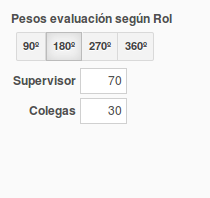 In this case, the supervisor's score will contribute 70% to the final grade and that of the group of colleagues 30%. If 2 colleagues evaluate you, each one will therefore contribute 15% to the grade final. In the event that a person does not have any colleagues, the supervisor's assessment would be the final grade of the person evaluated.
Overall Rating
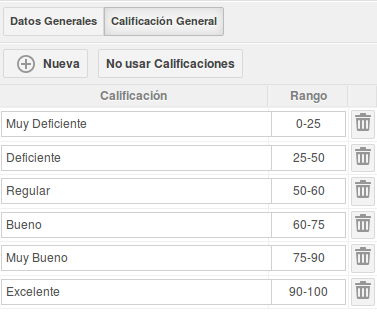 Optionally Hrider allows you to define grades for an assessment based on score ranges. The following image shows an example of ratings ranging from “Very Poor” to “Excellent”.
If qualifications are defined, the overall report for the organization and the individual reports for each person also display this information. The following image shows the Rating section for an overall organization report.
Model and methodology to apply to each position
To finalize the design of our evaluation, we only have to select a survey model and a specific methodology (90, 180, 270 or 360 degrees) for the positions that we want to evaluate from the central part of the editor:
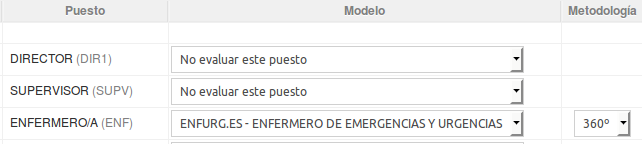
With this we have designed the fundamental aspects of our evaluation. The next steps will be to generate the surveys and plan the sending by email of the invitations asking the evaluators to participate in the evaluation. To continue we save and press the "Next" button.
-------------------------------------- ---------------------------------
We have seen how to plan the management of a performance evaluation and how to design it with Hrider. In the next installment of this blog we will finish seeing how the last two phases of the process are carried out: sending surveys and monitoring and closing the evaluation.
Remember that Hrider includes technical assistance in any of its modalities. You just have to access the Hrider contextual help that you will find in the toolbar and send us your question or suggestion, we will be happy to assist you!